

At conferences, we often get asked how you can increase risk coverage and ensure highest user experience. Fact is that budget constraints and time pressure force testers to achieve maximum results using a minimum of resources. In reality, there’ll always be those problems that occur once the product is released. These are difficult to predict, but can greatly impede the user experience. In this blog we want to show you why it often makes sense to combine functional GUI testing and load testing.
Why performance and functionality of a system are important
First and foremost, an app or website has to work correctly. In an online shop, the user has to be able to open the site, select the desired product, add it to the shopping cart and complete the order. If one of these steps doesn’t work, the user cannot buy the product. This leads to poor user experience (UX) and worst case, results in a lost customer. But also the reliability of a system influences the UX. A site has to work! But it has to work over and over again, even under varying conditions. It has to work when the traffic increases, different browsers are used, but also if new functionalities are added. If a website does not offer reliable performance, customers will shy away from using it. Fact is that functionality and performance are important to the success of your website.
Ideal case: you test every possible scenario. But tests take time and no one’s got time to spare. We need to decide which tests to automate, when and how often. A risk assessment is crucial to pick the right test cases.
Assess risk contribution of potential issues
When creating a test strategy with maximum risk coverage, you have to estimate the probability that certain issues occur and assess their impact on the system. Some functional issues only surface if the system is put under stress. These are particularly hard to predict. However unlikely these issues may be, their impact may just not be worth the risk. Just think about the consequences if a ‘Buy’ button in the shopping cart doesn’t appear on Cyber Monday, when thousands of people access the site at the same time.
Separated automated functional and load testing
Typically, testing types are clearly separated. This is also true for automated functional and load testing. Automated functional testing enables you to automatically and reliably verify the system’s functionality. Load testing verifies the system’s behavior under peak load. A typical sequence of tests could look like this:
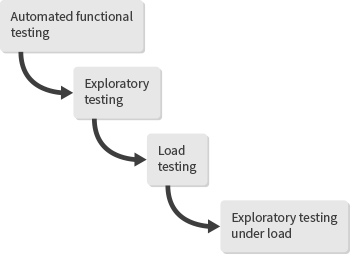
With functional automated testing, you first validate if your website or app works as expected. Next, the team tries to manually find bugs while exploring the software. These tests are performed while the system is idle. As soon as they succeed, a performance test verifies the system’s behavior in real usage conditions – varying traffic, multiple users, increased network load, etc. Finally, the team manually validates the system using simulated load conditions.
Downsides of separating load from functional testing
First of all, this testing scenario includes two sections of manual testing. Naturally, manual testing takes a lot of time, is brittle and reduces test coverage. Additionally, your automated functional tests will only provide you with feedback on how your system works in idle conditions. You won’t be able to evaluate the load test results for functional correctness. It is not until the very end of the testing process that you will find out how your system works under stress, in real usage conditions.
Benefits of combining automated functional and load testing
In reality, there will always be those bugs that occur if certain conditions correlate: the link breaks if the site traffic increases or the site content only loads after a refresh. To increase risk coverage and find those functional issues that manifest under load, we need to include load in our automated functional tests. A testing process could now look like this:
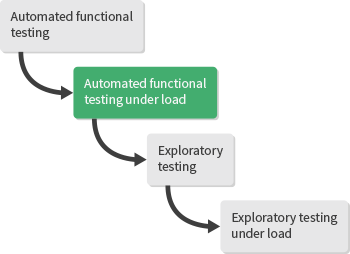
You can now incorporate a sustained load in your automated functional tests. This approach to testing enables you to reliably test key functionalities that are most valuable to your business under realistic usage condition. You will be able to identify those issues that only manifest under load early in the testing process, which makes it easier to fix them and will ultimately save you a lot of time. But more importantly, you will finally get tremendously important insights on how end users experience your website. Ultimately, it is up to you to assess the potential impact certain issues may have on your system and if combining these two testing types makes sense in your individual case.
We would like to announce that you can now combine Ranorex functional tests with NeoLoad performance tests!
Further Resources
- Blog How to Combine Ranorex and NeoLoad Tests: Find detailed instructions on how to set up the Ranorex-NeoLoad integration.
- Webinar Combining Automated Functional and Load Testing Webinar: Learn why and how to combine automated functional and load tests.
- Blog Ranorex-NeoLoad Webinar – Questions Answered: Get answers to questions asked during the Ranorex-NeoLoad webinar to fully understand how to set up the Ranorex-NeoLoad integration.