

The next stage of the test automation gap
Most QA teams do not struggle with test automation because they lack motivation. They struggle because the hardest parts of automation are rarely solved by adding more scripts, frameworks, or tools.
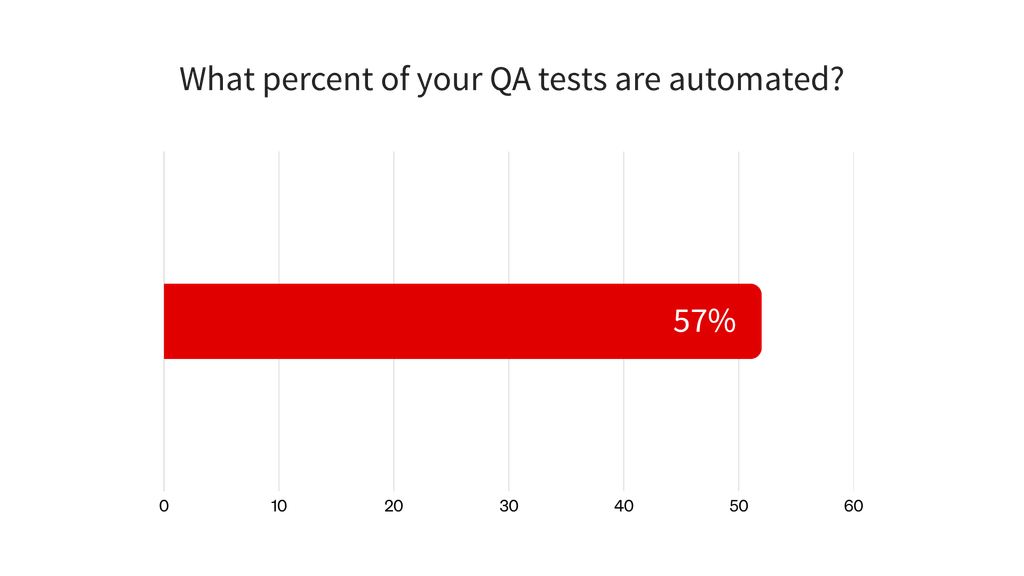
According to the 2026 Sembi Software Quality Pulse Report, teams automate 57% of QA tests on average. That represents meaningful progress, but it also leaves 43% of the testing manual.
The harder question is no longer whether teams have started automating. Most have. The question is whether they can automate the next layer: the complex, brittle, business-critical workflows that are harder to build, maintain, and trust.
That is where the test automation gap often widens.
The gap widens after the easy tests are automated
The first wave of automation can move quickly. Teams automate repeatable regression tests, stable workflows, and straightforward functional checks. These early wins reduce manual effort and create momentum.
Progress slows when the remaining tests involve dynamic interfaces, legacy systems, cross-platform workflows, test data dependencies, third-party integrations, or conditional business logic. These scenarios may be critical to the business, but they are also harder to automate reliably and more costly to automate poorly.
As a result, many teams are not starting from zero. They already have an automation suite, but that suite is too fragile, disconnected, or expensive to maintain to support the next stage of growth.
The most common test automation challenges
The 2026 Sembi Software Quality Pulse Report found that scripts breaking because of UI changes or application updates was the most commonly reported test automation challenge, cited by 39% of respondents.
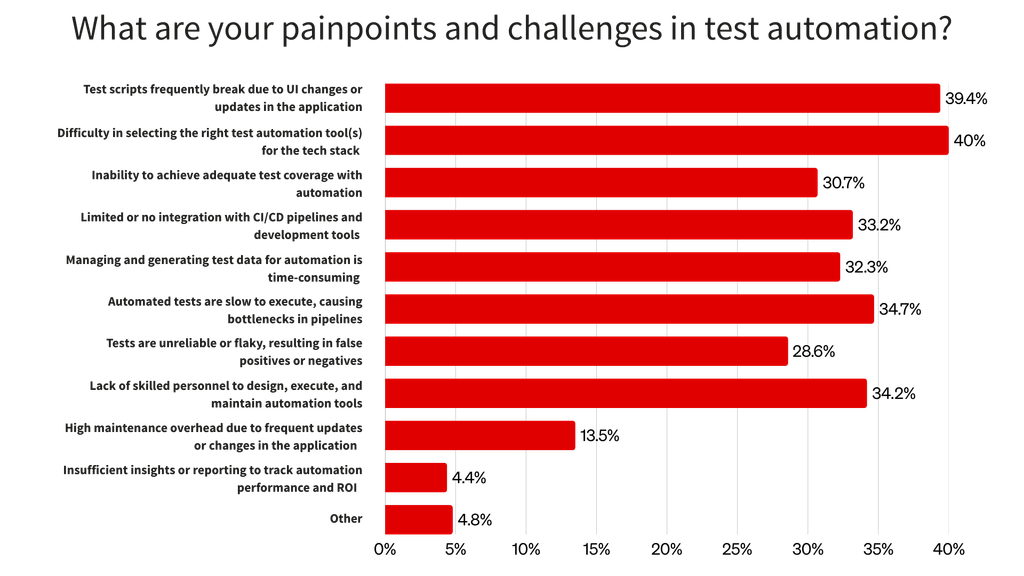
Other common obstacles included limited skills and capacity, weak CI/CD integration, time-consuming test data management, difficulty selecting appropriate tools, inadequate automation coverage, slow execution, and flaky tests.
These issues reinforce one another. Flaky tests create maintenance work, maintenance consumes time that could have expanded coverage, and limited coverage leaves more regression work manual. That slows feedback and increases pressure on QA, leaving even less capacity to improve the automation suite.
Understanding each blocker is the first step toward breaking that cycle.
Challenge 1: Flaky and brittle tests
Flaky and brittle tests are related but not the same. A flaky test produces inconsistent results without a relevant change to the application or test code. It may pass during one run and fail during the next because of timing problems, unstable environments, shared state, external dependencies, or inconsistent test data.
A brittle test fails when an implementation detail changes even though the intended behavior still works. This commonly happens when UI tests depend on unstable attributes, fragile selectors, fixed delays, or a particular screen structure.
Both problems damage trust. When a test fails, the team must determine whether the cause is a product defect, test script, environment, data state, synchronization issue, or UI change. Each investigation interrupts the feedback loop.
Over time, developers may start ignoring failed tests, while QA teams fall back on manual validation before approving a release. The automation suite still exists, but it no longer functions as a dependable quality signal.
This is especially common in UI automation because application interfaces change frequently and often contain dynamically generated elements. Ranorex’s guide to flaky tests explains how timing, dependencies, environments, and test design can create inconsistent results.
Test reliability matters as much as test volume. A large suite that teams do not trust is not closing the automation gap; it is adding another source of work.
Challenge 2: Constant test maintenance
Test automation is not a one-time project. Every automated test becomes part of a system that must evolve with the application.
As functionality changes, teams may need to update selectors, refresh test data, revise assertions, change navigation steps, or redesign entire workflows. Some maintenance is expected, but excessive maintenance becomes a growth blocker.
When teams spend most of their automation capacity repairing existing tests, they have little time to automate new scenarios. That creates a frustrating loop: the team wants to expand coverage, but the current suite consumes the resources needed to make progress.
The Overcoming the Test Automation Gap ebook identifies limited bandwidth for maintaining and updating scripts as a persistent barrier. Without clear ownership and maintainable test design, suites degrade as applications change.
This is where many teams feel the gap most acutely. They are not lacking automation; they are carrying automation that is too expensive to maintain and too fragile to scale. Practices such as reusable components, centralized object definitions, and stable test design can reduce that burden, as explained in this guide to building maintainable tests.
Challenge 3: Complex applications and workflows
Many teams can automate simple paths. The harder question is whether they can automate the workflows that matter most.
Complex applications may combine dynamic interfaces, custom controls, desktop components, embedded web views, mobile experiences, third-party integrations, and conditional business logic. End-to-end workflows may also depend on several systems, environments, and data states working together.
Legacy applications add another layer of difficulty. Older technologies may use custom or proprietary controls, depend on outdated environments, or lack the test hooks common in newer applications. Teams may need to support these systems for years while also testing modern web and mobile experiences.
The result is a familiar pattern: stable and simple tests become automated, while complex and business-critical workflows remain manual. Coverage may look broad when measured by test count, but remain shallow in the areas with the greatest operational risk.
That is why automation feasibility depends on more than whether a tool can record a workflow. Teams need reliable object recognition, support for the technologies under test, control over synchronization and data, and enough flexibility to handle custom logic. Ranorex’s guide to legacy application test automation explores these constraints in more detail.
Challenge 4: Fragmented testing and tooling
Fragmented tooling is one of the most overlooked causes of the test automation gap.
Many QA organizations use a mix of automation frameworks, test management systems, CI/CD tools, reporting dashboards, spreadsheets, scripts, and team-specific workflows. Each tool may work well independently, but the overall process becomes difficult to manage when results, standards, and ownership are disconnected.
Fragmentation can lead to:
- Manual and automated testing being tracked separately
- Results being scattered across systems and dashboards
- Different teams using incompatible tools and standards
- Inconsistent coverage measurement
- Duplicate automation work
- Limited visibility into quality risk and automation ROI
Automation does not scale through scripts alone. It also depends on shared processes, reusable assets, consistent standards, actionable reporting, and reliable execution across teams and pipelines.
Without that foundation, successful automation work remains isolated within individual teams. As the organization grows, each additional framework, platform, or reporting system adds another integration and maintenance responsibility. This makes a scalable test automation approach increasingly important.
Challenge 5: Limited skills and team capacity
Test automation sits at the intersection of testing knowledge, software development, infrastructure, tooling, and process design. Finding all of those skills in one team can be difficult.
Manual testers may understand the product and its users deeply but have limited coding experience. Automation engineers may understand frameworks and architecture but lack the domain context needed to identify the highest-value scenarios. Some teams may not have dedicated automation engineers at all.
The Software Quality Pulse Report reflects this constraint: 34% of respondents cited a lack of skilled personnel as a test automation challenge.
Capacity matters just as much as technical skill. Even experienced teams struggle to expand automation when the same people are responsible for release validation, production support, defect reproduction, environment troubleshooting, and test maintenance.
This is why teams often need more than one path into automation. Low-code workflows can help testers contribute without becoming full-time developers, while full-code flexibility gives automation engineers control over complex logic and integrations. Supporting both approaches can broaden participation without lowering the technical ceiling.
Challenge 6: Weak CI/CD integration
Automation creates the most value when it provides fast, relevant feedback.
When tests are disconnected from the delivery pipeline, that feedback often arrives too late. Automated suites may run only after development is complete, after code is merged, or during a separate QA validation cycle. Failures then become more expensive to investigate because the change that caused them is no longer fresh.
The Software Quality Pulse Report found that 33% of respondents considered limited or missing integration with CI/CD pipelines and development tools a test automation challenge. It also found that only about 26% of QA teams were mostly or fully integrated with DevOps workflows.
Teams with deeper integration report faster release cycles and lower defect leakage because automated results become part of the development feedback loop rather than a separate testing event.
DORA’s research on generative AI in software development reinforces the importance of fast feedback. As AI makes it easier to produce larger code changes, automated testing and rapid code review become important safeguards against instability.
Without effective CI/CD test automation, automation remains a downstream activity instead of a continuous quality signal.
Challenge 7: Poor test data management
Test data is sometimes treated as a secondary concern, but it can determine whether an automated test is repeatable and trustworthy.
Automated tests need predictable data and a known starting state. Without them, teams may have to create records manually, reset environments, clean up transactions, manage permissions, or troubleshoot failures caused by data left behind during earlier runs.
The Software Quality Pulse Report found that 32% of respondents considered generating and managing test data time-consuming.
The challenge grows with workflow complexity. A test may depend on a customer having a particular account type, permission level, transaction history, subscription state, or connection to another system. If the team cannot provision those conditions consistently, the test becomes difficult to run unattended.
Poor test data can also create false failures that look like product defects. Over time, those failures contribute to the same trust and maintenance problems created by flaky tests.
Effective test data management must therefore account for repeatability, isolation, reuse, privacy, and cleanup—not just data generation.
Challenge 8: An unclear automation strategy
Many automation programs stall because teams are not aligned on what should be automated first or how success should be measured.
Without a clear strategy, teams may automate scenarios because they are easy rather than valuable. They may build a large collection of UI tests while neglecting lower-level coverage, automate workflows that rarely run, or choose tools before defining the applications, skills, environments, and integrations those tools must support.
Test count then becomes a misleading measure of progress. A team may have hundreds of automated tests but little protection around the workflows that carry the greatest business risk.
The goal is not simply to produce more automation. Teams need coverage where it matters most, which requires prioritization based on risk, execution frequency, business criticality, repeatability, and maintenance cost.
A defined test automation strategy gives teams a basis for making those tradeoffs. Without one, automation activity can increase while the gap between coverage and risk remains unchanged.
Challenge 9: AI-driven development pressure
AI did not create the test automation gap, but it is making the consequences more visible.
AI-assisted development can increase the pace and volume of software change. The 2026 Sembi Software Quality Pulse Report found that 61% of respondents experienced moderate to dramatic increases in QA testing demand because of AI-generated code.
If development output grows while testing capacity remains fixed, QA can become a constraint. Brittle automation creates more maintenance, incomplete coverage leaves more regression work manual, and delayed pipeline feedback makes it harder to evaluate changes quickly.
DORA has also warned that AI-generated code can lead to larger batches that are harder to review, test, and integrate safely. Working in smaller batches and validating changes through automated testing can reduce that risk, but only if teams already have tests they trust.
AI can support testing as well. It can assist with test design, failure analysis, prioritization, and maintenance. However, those capabilities do not remove the need for stable test architecture, reliable data, appropriate coverage, and human judgment. Ranorex’s guide to AI in DevOps testing explains where AI can help and where established testing practices still matter.
AI raises the stakes for automation maturity. Teams need tests that are not only numerous, but also reliable, maintainable, connected, and aligned with risk.
The blockers QA teams want to fix next
QA teams understand where automation needs to improve. According to the Software Quality Pulse Report, reducing test breakages was the most frequently selected improvement goal, cited by 45% of respondents.
Other priorities included better test data management, more skilled personnel, better-fitting tools, fewer flaky tests, stronger coverage, faster execution, and deeper CI/CD integration.
The priorities reflect a shift in how teams think about automation. The challenge is no longer simply getting started. Teams want automation that remains stable as applications change, fits into delivery workflows, supports complex testing needs, and produces results that developers and QA leaders can trust.
Turning that awareness into a practical plan is the next stage of closing the test automation gap.
What these challenges mean for QA teams
The test automation gap is not caused by one issue. It is caused by several issues reinforcing each other.
Flaky tests reduce trust. Maintenance consumes capacity. Complex workflows stay manual. Fragmented tools limit visibility. Skill gaps slow execution. Poor CI/CD integration delays feedback. Weak test data creates instability. AI-driven development increases testing demand.
Together, these issues make it difficult for teams to automate as much testing as they need.
The good news is that these challenges can be solved. But they require a more mature approach to automation. Teams need to understand where automation is breaking down, stabilize what they already have, connect testing across tools and pipelines, and choose platforms that can handle the complexity of their applications and workflows.
That is the next step in closing the test automation gap.
Take the Test Automation Maturity Assessment to identify your biggest automation blockers and see where your team can improve coverage, reliability, and scale.
Explore the test automation gap series
- What Is the Test Automation Gap and What Is It Costing Your Team?
- How Mature QA Teams Close the Test Automation Gap
- Why Ranorex Is Built for Complex, Reliable Test Automation
FAQ
Why do QA teams struggle with test automation?
QA teams struggle with test automation because of flaky tests, brittle scripts, complex applications, fragmented tooling, limited skills and capacity, weak CI/CD integration, test data problems, and an unclear automation strategy.
What causes flaky automated tests?
Flaky automated tests are often caused by timing and synchronization problems, unstable environments, inconsistent test data, external dependencies, shared state, or poor test isolation. Brittle selectors and UI changes can also cause failures, although those failures may be repeatable rather than intermittent.
Why is test maintenance such a problem?
Test maintenance becomes a problem when teams spend so much time repairing existing tests that they cannot expand automation coverage. Excessive maintenance slows progress and can make automation more expensive than the team expected.
How does fragmented tooling affect test automation?
Fragmented tooling separates results, workflows, standards, and ownership across systems. This makes it harder to measure coverage, reuse automation assets, diagnose failures, maintain consistent practices, and understand quality risk across teams.
How does AI-generated code affect QA teams?
AI-generated code can increase the pace and volume of software changes. If testing capacity and automation reliability do not grow with that demand, QA teams may face more regression work, maintenance, review pressure, and release risk.