
The test automation gap is the difference between the testing a team wants or needs to automate and the testing it can realistically automate with its current tools, processes, skills, and capacity.
Test automation has long promised faster feedback, less manual regression work, greater release confidence, and more time for higher-value QA work. Yet many teams automate the easiest scenarios first and then stall when they reach complex UI workflows, legacy applications, changing interfaces, brittle scripts, and ongoing maintenance.
Over time, the level of automation they want becomes much greater than what they can realistically implement. That difference is the test automation gap, and AI-assisted development is making it harder to ignore.
The test automation gap existed before AI
Before AI began changing the software development lifecycle, QA and engineering teams were already under pressure to increase automation coverage. They wanted to reduce manual testing, shorten regression cycles, improve release confidence, and build automation suites that could scale with modern development. In practice, however, progress was often slow and limited.
According to the 2026 Sembi Software Quality Pulse Report, teams automate 57% of QA tests on average, leaving 43% manual.
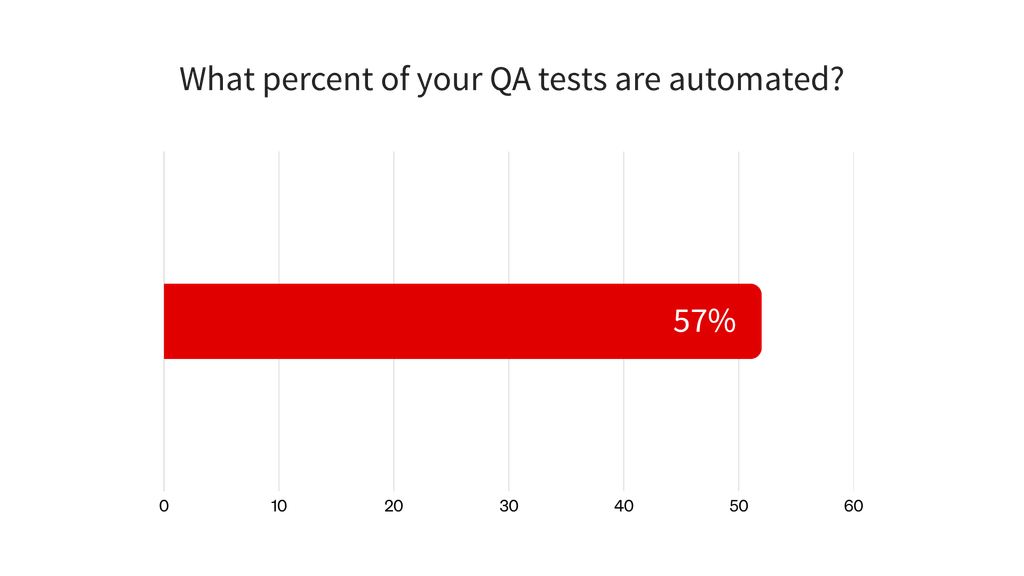
The Overcoming the Test Automation Gap ebook defines the gap as the difference between the number of tests teams want to automate and the reality of their current automation suite. Earlier Sembi research cited in the ebook found that teams automated approximately 40% of their tests on average while setting significantly higher automation goals.
That is the central paradox: test automation has been a priority for years, but many teams still struggle to make meaningful progress toward their goals.
Why automation progress stalls
Most teams do not struggle with automation because they lack ambition. They struggle because the hardest parts of automation are not solved by simply writing more tests.
Teams often automate stable, repetitive tests first and then encounter more difficult barriers, including brittle UI scripts, legacy applications, fragmented tooling, skill gaps, and ongoing maintenance. These challenges limit coverage and keep regression work manual even when automation remains a priority.
The 2026 Sembi Software Quality Pulse Report reinforces this pattern. The most common test automation challenge was scripts breaking because of UI changes or application updates, cited by 39% of respondents. Other major challenges included limited or no CI/CD integration at 33%, difficulty selecting the right automation tools at 32%, and inadequate automation coverage at 31%.
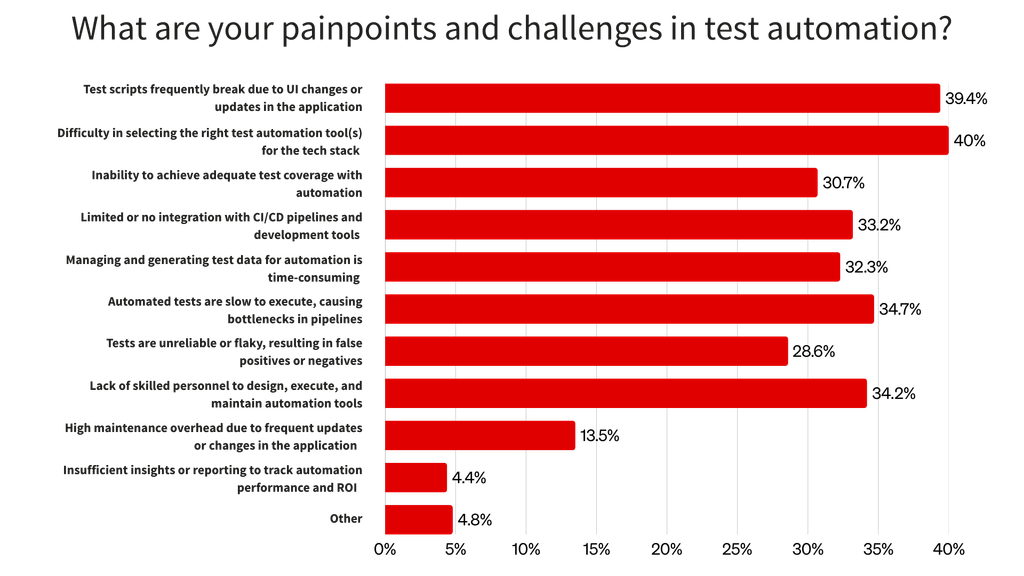
These challenges compound one another. Flaky tests create maintenance work, fragmented tools make failures harder to diagnose and standardize, and weak CI/CD integration keeps execution disconnected from the delivery pipeline. Scattered reporting also makes it difficult to see where coverage is improving or where risk is growing.
Lower automation coverage keeps more regression work manual, and heavy reliance on manual regression testing can slow releases. That pressure leaves teams with less time to step back, stabilize their tests, or reconsider their automation approach.
The next article in this series, “Why QA Teams Struggle to Automate More of Their Testing,” examines why these barriers persist and how they widen the test automation gap.
The hidden costs of low automation coverage
Low automation coverage does not always appear to be a major problem at first. A team may still release software, complete regression cycles, provide feedback to developers, and deliver updates to customers.
Underneath that progress, however, too much repetitive manual testing can create costs across the software delivery process.
Slower release cycles
Manual regression testing takes time. Every release requires QA teams to repeat test cases, validate critical workflows, document results, and communicate issues back to development.
As applications grow, that regression burden becomes heavier. Eventually, release speed may be constrained not by how quickly developers can build, but by how quickly QA can validate the changes.
Higher QA workload
When automation coverage is low, QA teams spend more time repeating known test cases and less time on exploratory testing, risk analysis, usability feedback, edge cases, and strategic quality work.
Manual testing still matters because not every test should be automated. Exploratory and usability testing rely heavily on human judgment, while accessibility, security, and compliance testing often combine automated checks with expert review and contextual analysis. An effective automation program focuses on automating the right tests rather than trying to automate every possible scenario.
Greater risk of escaped defects
Manual testing is valuable, but it is difficult to scale across every critical path as release cycles accelerate and applications become more complex. Relying on manual validation for every regression scenario can increase the chance that issues go undetected.
The Consortium for Information & Software Quality estimated that poor software quality cost the United States at least $2.41 trillion in 2022. That cost cannot be attributed to low automation alone, but the report demonstrates the wider business consequences of software failures, supply chain problems, cybercrime, and growing technical debt.
Lower confidence in releases
Reliable automation creates fast, repeatable feedback that helps developers and QA teams understand whether a change introduced risk.
When critical regression coverage remains manual, teams may receive slower or less consistent feedback. They may delay releases because testing is incomplete or depend on manual sign-off without enough repeatable regression coverage behind it.
Less time to improve automation
The teams that need better automation are often the same teams with the least capacity to build it. They are already handling manual regression work, production validation, release support, defect reproduction, and test maintenance.
That creates a self-reinforcing cycle:
- Manual testing consumes capacity.
- Limited capacity slows automation progress.
- Slow automation progress keeps repetitive manual testing high.
This cycle is one of the clearest signs that a team is stuck in the test automation gap.
AI is widening the test automation gap
The test automation gap was already a problem, but AI is making it more urgent.
AI-assisted development can help teams generate code, create prototypes, and complete repetitive development tasks faster. When that increased output reaches production in the form of more frequent or larger changes, QA teams may have more behavior to validate and more regression risk to manage.
DORA’s research on generative AI in software development found that faster AI-assisted code generation can lead to larger batch sizes that take longer to review and are more likely to create instability. This makes safeguards such as automated testing, small batches, and fast code reviews even more important.
The 2026 Sembi Software Quality Pulse Report found that 61% of respondents experienced moderate to dramatic increases in QA testing demand because of AI-generated code. If a team already has brittle automation, weak CI/CD integration, or too much manual regression work, that additional demand can amplify the weaknesses in its testing process.
AI is not inherently bad for software quality. It can also help QA teams generate tests, identify coverage gaps, and improve automation workflows. As explained in this guide to generative AI in software testing, the value depends on how well teams review, maintain, and integrate AI-assisted testing into their existing quality processes.
The challenge is not simply that AI can produce more code. It is that testing demand can grow faster than teams can expand reliable, maintainable automation.
Signs your team may have a test automation gap
Your team may have a test automation gap if any of the following sound familiar:
- Too much manual regression testing before every release
- Automated tests that require constant maintenance
- Flaky test results that slow down triage
- UI changes that frequently break scripts
- Complex workflows that remain manual
- Desktop, web, and mobile testing split across tools
- Manual and automated testing tracked separately
- Test results scattered across systems and dashboards
- Limited visibility into coverage, execution, and risk
- Teams duplicating automation work
- Slow test execution in the pipeline
- Low developer trust in automation results
- QA becoming a release bottleneck
- Unclear fit between tools and testing needs
- AI-generated code increasing testing demand faster than automation can scale
These signs do not mean the team has failed. They usually mean the team has outgrown its current automation approach.
How to measure the test automation gap
The test automation gap becomes easier to address once it is measurable. A useful starting point is to examine these metrics:
- Automation coverage: What percentage of your regression suite is automated? More importantly, what percentage of your highest-risk and most business-critical workflows are automated? Learn more about measuring automation test coverage.
- Manual testing hours per release: How much time does QA spend on manual regression testing before each release?
- Flaky test rate: How often do automated tests fail for reasons unrelated to an application defect?
- Test maintenance effort: How much time does the team spend fixing, updating, or troubleshooting existing automated tests?
- CI/CD integration: Are automated tests integrated into the development pipeline, or are they run separately after the fact? Evaluating CI/CD test automation tools can help teams identify integration gaps.
- Release confidence: Does the team trust its test results enough to release faster, or does every release still require heavy manual validation?
- Tooling fragmentation: How many systems are involved in planning, creating, executing, reporting, and maintaining tests? Are results connected, or must teams assemble data from multiple tools, dashboards, and spreadsheets?
These metrics move the conversation from “we need more automation” to a more useful question: “Where is our automation approach breaking down?”
The goal is not 100% automation
Closing the test automation gap does not mean automating everything.
Some testing should remain human-led, and some scenarios deliver too little value to justify the cost of automating and maintaining them. The better goal is effective automation: automating the right tests, stabilizing the tests you already have, and expanding coverage where automation creates the most value.
The third article in this series will explain how mature QA teams prioritize automation, improve reliability, and build a strategy that can scale across complex applications and faster release cycles.
Where Ranorex Studio fits
Ranorex Studio is designed to help teams automate complex desktop, web, and mobile workflows using both low-code and fully scripted approaches. Later in this series, we will examine how its object recognition, reusable test components, reporting, and DevOps integrations help teams improve reliability and scale automation across complex applications.
Closing the gap starts with understanding where you stand
The test automation gap is not a single problem. It is the result of several pressures coming together, including limited coverage, flaky tests, manual regression work, complex applications, fragmented tools, skill gaps, and rising testing demand.
AI is making that challenge more urgent. As development accelerates, testing must become faster, more reliable, and easier to scale.
Start by asking:
- How much of our testing is automated?
- Where does our automation break down?
- Which tests are too flaky to trust?
- Which critical workflows still depend on manual effort?
- Which tools help us scale, and which ones create more work?
Once your team can answer those questions, you can begin closing the gap.
Take the Test Automation Maturity Assessment to see where your team stands and identify the next steps for improving automation coverage, reliability, and scale.
Explore the test automation gap series
- Why QA Teams Struggle to Automate More of Their Testing
- How Mature QA Teams Close the Test Automation Gap
- Why Ranorex Is Built for Complex, Reliable Test Automation
FAQ
What is the test automation gap?
The test automation gap is the difference between the testing a team wants or needs to automate and the testing it can realistically automate with its current tools, processes, skills, and resources.
Why does the test automation gap happen?
The test automation gap develops when teams cannot scale automation because of flaky tests, brittle scripts, complex applications, legacy systems, limited technical resources, maintenance overhead, poor CI/CD integration, or tools that do not fit their testing needs.
What are the hidden costs of too much manual testing?
Too much repetitive manual testing can slow release cycles, increase QA workload, reduce release confidence, delay feedback to developers, increase the risk of escaped defects, and limit the time QA teams have to improve automation.
How does AI-generated code affect test automation?
AI-generated code can increase the pace and volume of software changes. If automation coverage is low or unreliable, that additional change can increase testing pressure and widen the automation gap.
Is 100% test automation the goal?
No. The goal is to automate the right tests in a reliable, maintainable, and scalable way while preserving human-led testing for areas that require judgment, creativity, and context.