From understanding the gap to closing it
The test automation gap is the difference between the testing a team needs to automate and what it can automate reliably with its tools, skills, and capacity. It often persists after stable workflows have been automated.
The tests left behind tend to involve dynamic interfaces, legacy applications, custom controls, cross-platform processes, and complex dependencies. As the second article in this series explains, QA teams struggle to automate more testing when brittle scripts, maintenance demands, fragmented tools, and limited capacity reinforce one another.
Closing the gap requires more than adding scripts. Teams need a UI test automation platform that can identify elements, cover their application technologies, support different skill levels, and fit existing delivery processes. Ranorex Studio is built around those requirements.
What complex test automation requires
Complex test automation is measured by whether teams can automate high-risk workflows and keep those tests dependable as the application changes. That calls for:
- Accurate object recognition for dynamic, custom, and deeply nested UI elements
- Support for desktop, web, and mobile applications
- Reusable components and centralized element definitions
- Low-code test creation with full-code options for custom logic
- CI/CD integration for timely feedback
- Deployment and licensing options suited to enterprise QA
They support the practices in How Mature QA Teams Close the Test Automation Gap: prioritize by risk, stabilize tests, design for reuse, and connect automation to the pipeline.
Serious UI testing for complex applications
UI automation becomes harder when a test must navigate a Windows desktop client, interact with a custom grid, move into a browser portal, and validate a process whose steps change with data or permissions.
Ranorex Studio supports automated UI testing across these mixed environments, including modern and legacy Windows technologies, web applications, and mobile apps. Ranorex Spy lets testers inspect UI hierarchies and element properties, while RanoreXPath gives them control over element identification.
This matters for legacy application testing and custom interfaces. Tools that rely on screen position or one fragile property may struggle with dynamic controls, unusual hierarchies, or technologies outside browser-first frameworks. Ranorex lets testers refine recognition paths and add code when a recording is not enough.
For enterprise test automation, teams can address business-critical paths that might otherwise remain manual, not only the easiest scenarios to automate.
Precision through advanced object recognition
The 2026 Sembi Software Quality Pulse Report found that 39% of respondents said test scripts frequently break because of UI changes or application updates. That was the most commonly reported test automation challenge.
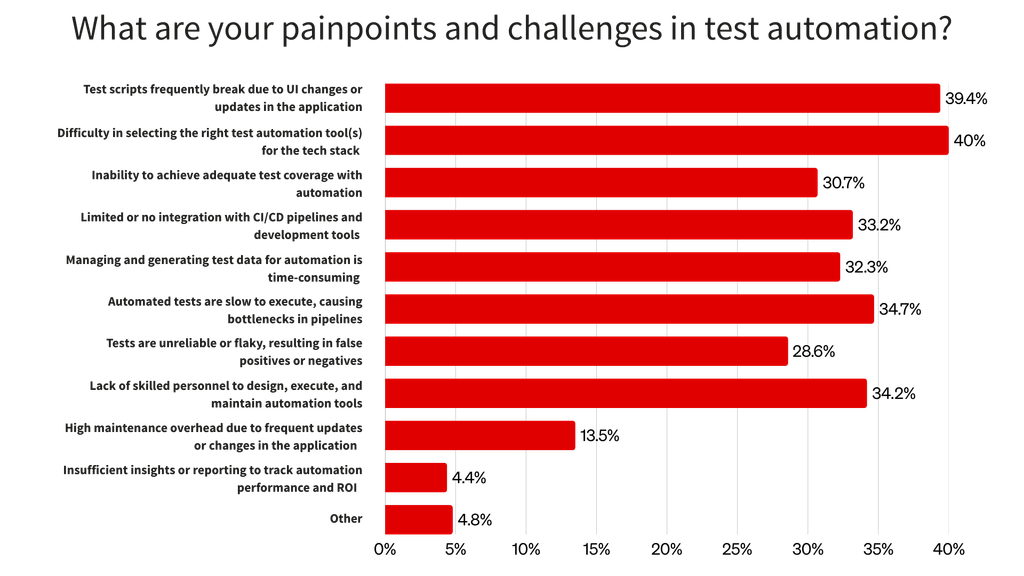
Object recognition is central to reducing this breakage. If a test depends on coordinates, generated identifiers, or overly specific paths, a minor interface change can cause failure even when the workflow still works.
Ranorex Spy and RanoreXPath identify elements using their properties and UI hierarchy. Testers can choose stable attributes, apply flexible matching rules, and store definitions in a central object repository. When an element changes, its repository definition can be updated instead of every test that uses it.
This can reduce maintenance and false failures caused by UI changes. It does not solve every source of flaky tests: timing, data, shared state, environments, and external dependencies still need their own controls. But it addresses a major source of instability.
One platform for desktop, web, and mobile testing
Platform boundaries often create tool fragmentation: one framework for browsers, another for native Windows applications, and a third for mobile. Each adds skills, object models, reporting formats, and integrations.
Ranorex Studio supports desktop, web, and mobile test automation within one platform. Teams can test Windows applications, browser workflows, and Android or iOS apps without building an unrelated UI framework for each.
This cross-platform test automation model is useful when a process spans applications—for example, when it begins on desktop, continues on the web, and finishes on mobile. A shared environment can make components easier to reuse and results easier to interpret.
Teams may still need specialized tools for other test types. Ranorex provides a consistent foundation for functional UI automation.
Low-code and full-code flexibility
Automation needs input from people with different technical backgrounds. Manual testers may know product risk in depth, while engineers build custom logic and integrations.
Ranorex Studio’s test automation tools support both groups. Ranorex Recorder turns user actions into editable steps to which testers can add validations, parameters, data sources, conditions, and reusable modules.
For more control, engineers can create or extend code modules using C# or VB.NET, call the Ranorex API, and combine coded components with low-code modules. Low-code test automation helps domain experts create repeatable tests; full-code flexibility lets engineers handle edge cases and shared utilities.
Reuse, maintainability, and team collaboration
Automation is difficult to scale when every test contains its own locators, login steps, navigation logic, and data setup. Ranorex supports reusable test automation through recording modules, code modules, data-driven testing, and object repositories.
Teams can build common actions once and use them across test cases. Centralized repository items let tests share definitions for buttons, fields, menus, and other elements. If an element changes, its repository entry can be updated without rebuilding every workflow that references it.
Reuse still requires naming conventions, ownership, version control, review practices, and boundaries for shared assets. Ranorex provides the building blocks; the team’s architecture determines how effectively they reduce duplication and maintenance.
DevOps and enterprise readiness
UI test automation creates more value when results arrive early enough to influence a release. Ranorex Studio connects to CI/CD workflows so selected tests can run after builds or at other defined pipeline stages.
It provides integrations and execution options for tools such as Jenkins and Azure DevOps, plus command-line execution for other setups. Teams can run focused tests early and reserve broader UI suites for stages suited to their execution time and environment needs.
Ranorex also supports on-premises deployment and remote execution for organizations that keep tests and application data in controlled environments. Teams still need access controls, stable environments, reporting standards, and ownership.
Where Ranorex fits compared with Selenium and Playwright
Selenium and Playwright are capable open-source browser automation tools. Selenium offers broad browser and language support with a large ecosystem. Playwright suits modern web applications and provides developer-focused automation and debugging. For code-first, web-only teams, either may be the right choice.
Ranorex is a stronger candidate when requirements extend to native Windows desktop test automation, mobile coverage, custom or legacy controls, low-code authoring, and full-code customization. Teams may also prefer commercial support and managed tooling over maintaining more framework infrastructure internally.
That makes Ranorex a possible Selenium alternative or Playwright alternative for some teams, not a universal replacement. The decision should follow the application portfolio, contributor skills, pipeline, maintenance tolerance, and deployment needs.
Teams already using Selenium do not necessarily need to discard that work because Ranorex supports Selenium WebDriver-based testing. The practical question is which approach can reliably automate the workflows the team owns.
How Ranorex helps close the test automation gap
Ranorex maps directly to several blockers that keep valuable tests manual or make existing suites difficult to trust.
| Challenge | Ranorex capability |
| UI tests break after interface changes | Advanced object recognition with Ranorex Spy and RanoreXPath |
| Complex workflows remain manual | UI automation for complex, custom, and legacy applications |
| Desktop, web, and mobile testing is fragmented | Cross-platform support in one development environment |
| Technical capacity is limited | Low-code test creation plus full-code C# and VB.NET options |
| Test maintenance consumes too much time | Reusable modules and centralized object repositories |
| Automation is disconnected from delivery | CI/CD integrations and command-line execution |
| Enterprise teams need controlled execution | On-premises deployment and remote execution options |
Teams still need to prioritize high-risk tests, design maintainable modules, control test data, and act quickly on failures. Ranorex gives them a platform for applying those practices to complex UI workflows.
Build a stronger foundation for reliable UI automation
Closing the test automation gap means expanding reliable coverage where it reduces risk, shortens feedback, and removes repetitive manual work.
Ranorex Studio supports that work across complex desktop, web, and mobile applications. Its object recognition, reusable assets, CI/CD integration, and low-code and full-code options provide a stronger base for automation that must remain useful as applications change.
Start a free trial to test Ranorex Studio against your own application, or book a demo to discuss your workflows with a Ranorex expert. To evaluate your broader strategy first, take the Test Automation Maturity Assessment.
Explore the test automation gap series
- What Is the Test Automation Gap and What Is It Costing Your Team?
- Why QA Teams Struggle to Automate More of Their Testing
- How Mature QA Teams Close the Test Automation Gap
FAQ
What is Ranorex used for?
Ranorex Studio creates, executes, and maintains functional UI tests for desktop, web, and mobile applications. Teams use it for regression, end-to-end, cross-browser, data-driven, and CI/CD testing. It supports low-code authoring and custom C# or VB.NET code.
How does Ranorex help close the test automation gap?
Ranorex helps teams automate complex workflows that brittle scripts or web-only tools may not cover well. Its object recognition, cross-platform support, reusable components, authoring options, and CI/CD integration address common barriers to maintainable automation.
Is Ranorex an alternative to Selenium or Playwright?
It can be. Selenium and Playwright are strong choices for code-first browser automation. Ranorex may be a better fit when teams also need Windows desktop or mobile testing, low-code creation, centralized object management, support for complex or legacy UIs, and commercial product support. The right choice depends on the applications and workflows under test.
Does Ranorex support low-code and full-code automation?
Yes. Testers can use Ranorex Recorder and visual modules to create tests with little or no code. Engineers can extend those tests or create code modules with C# or VB.NET and the Ranorex API. Both approaches can be used within the same test solution.
Does Ranorex support desktop, web, and mobile testing?
Yes. Ranorex Studio supports UI test automation for Windows desktop applications, web applications across supported browsers, and Android and iOS applications. Supported technologies and setup requirements vary, so teams should verify their specific application stack during a trial or product evaluation.